



You just accidentally deleted a crucial voice memo from a client meeting, or maybe you cleared out a text thread that contained a verified shipping address. You take a deep breath and tell yourself it’s fine. You back up your phone every night. You’re covered.
Then you actually look into how to get that one specific file back, and the illusion of safety shatters.
Apple’s backup ecosystem is brilliant for catastrophic failure. If you drop your phone in a lake, a backup saves your life. But for the far more common disaster—accidentally deleting a single file while the phone is sitting right there in your hand—a standard backup is almost useless.
Here is why the “just restore from backup” advice fails working professionals, and what you actually need to do when the native safety nets fall short.
The “All-or-Nothing” Problem with Apple Backups
The biggest misconception about iCloud and iTunes/Finder backups is that they act like a traditional computer hard drive. They don’t. You cannot just open a backup folder, browse your files, and drag a deleted photo or text message back to your desktop.
Apple treats a backup as a complete snapshot in time. If you deleted a vital contract photo on Tuesday, and your last backup was Monday night, your only native option to get that photo back is to wipe your entire phone and restore Monday’s snapshot.
Think about what that actually means for a business user. To get back one photo from Monday, you have to erase every email you received, every new contact you saved, and every new message you sent on Tuesday. You are essentially burning down the house to kill a spider. For anyone using their iPhone as a primary work tool, that “all-or-nothing” nuclear option simply isn’t viable.
The 30-Day Trap
Before we talk about third-party solutions, we have to address the “Recently Deleted” folder. Apple gives you a 30-day grace period for photos, notes, and voice memos. It’s a great feature, right up until the day you realize you permanently deleted something 31 days ago, or you panicked and hit “Empty Trash” without thinking.
Once that folder is empty, the iOS interface washes its hands of your data. The phone marks that storage space as “available to be overwritten.” The file is usually still physically sitting on the flash storage chip, but the operating system will no longer show it to you.
This is the exact gap where general IT advice ends, and specialized recovery software has to step in.
The Surgical Approach: Extracting Without Overwriting
When a native restore is off the table, you need a tool that can read the raw data without altering your current, live phone. You need a surgical strike, not a blanket wipe.
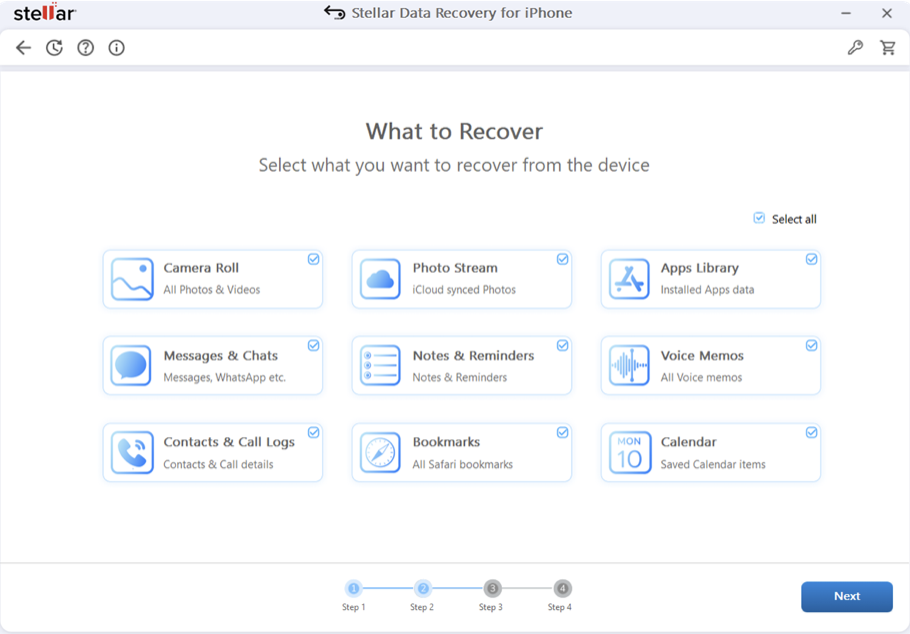
This is precisely why Stellar Data Recovery for iPhone has become the default recommendation for professionals who can’t afford to lose their current work just to retrieve an old file.
Instead of forcing you to roll your entire device back in time, Stellar acts as a translator. It connects to your computer, reads the hidden databases on your live iPhone (or your local iTunes/Finder backup files), and translates that raw code back into readable files.
Here is why this approach actually works for business continuity:
• Zero Overwrite Risk: The software runs entirely from your Mac or PC. It scans the phone in a “read-only” state. It will not overwrite the very data you are trying to save, nor will it delete your current emails or apps.
• Encrypted Backup Access: If you use local, encrypted Finder/iTunes backups (which most security-conscious professionals do), Stellar can decrypt and read those files using your password, allowing you to cherry-pick old data without restoring the whole phone.
• Preview Before You Commit: You don’t have to guess if the file is actually recoverable. The software shows you the actual text of deleted messages, the thumbnails of lost photos, and the audio waveforms of voice memos before you spend a dime or save a file.
When to Use Software vs. When to Call IT
It is important to manage expectations. iPhone Data recovery software is a logical fix, not a physical one.
If your phone is stuck in a boot loop after an iOS update, or you accidentally factory-reset the device without a backup, tools like Stellar Data Recovery for iPhone are your best bet to pull data off the live chip or parse an old local backup.
However, if your phone was run over by a car or suffered severe water damage and won’t power on at all, software can’t help you. The flash storage needs power to be read. In those cases, you need a physical cleanroom data recovery lab, not an app.
But for the 95% of data loss scenarios—accidental swipes, buggy app updates, or cleared message threads—having a dedicated extraction tool on your laptop is the only way to bypass Apple’s rigid, all-or-nothing backup rules.
Frequently Asked Questions (FAQs)
Can I extract a single deleted text message from an iCloud backup?
No, Apple does not allow you to extract individual files from an iCloud backup natively; you can only restore the entire backup to a device. To recover specific deleted messages without wiping your phone, you must use third-party software to scan the live device or a local iTunes/Finder backup file.
Will running recovery software overwrite my current iPhone data?
No. Professional tools like Stellar Data Recovery for iPhone operate in a strict read-only mode. The software scans the device’s storage or backup files from a connected computer without modifying, deleting, or overwriting any of your current live data.
Can I recover permanently deleted WhatsApp chats on iPhone?
Yes, if the data has not yet been overwritten by new files. By connecting your iPhone to a computer and running a deep scan, recovery software can locate the hidden database files where WhatsApp stores chat histories and media, allowing you to extract them selectively.
Does Apple Support recover permanently deleted photos?
No. Apple Support cannot manually reach into your device’s storage to restore permanently deleted files. Once a photo is removed from the “Recently Deleted” folder, Apple considers it unrecoverable natively, leaving third-party forensic extraction software as your only option.
The Bottom Line
We treat our iPhones like digital filing cabinets, but Apple designed them to be sealed vaults. Backups are essential for hardware failure, but they are remarkably clumsy tools for everyday file retrieval.
When a critical piece of data goes missing, don’t let the panic of a “full restore” dictate your next move. Stop using the phone to prevent overwriting the hidden data, connect it to a computer, and use a targeted extraction tool to get exactly what you need. In business, as in data recovery, precision always beats brute force.
